





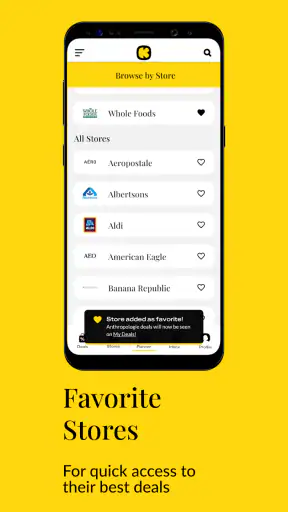


I tend to be skeptical of coupon apps. Saving money sounds simple, but the real experience can involve expired offers, too many alerts, unclear redemption steps, and a shopping routine that takes longer than the discount is worth. After spending time with Krazy Coupon Lady, I found a more focused approach: it acts as a shopping companion for finding deals, promo codes, and coupons across familiar retailers rather than trying to replace the stores themselves.
That distinction matters. The app is free, aimed at everyone, and built by Krazy Coupon Lady, a developer known for organizing savings opportunities into practical shopping ideas. Its public reception is strong, with a 4.8 average from roughly 71 thousand ratings and more than a million installs. Those figures do not guarantee that every offer will suit you, but they do suggest that the app has become a regular tool for many bargain hunters.
My overall impression is that it works best when I open it with a specific shopping intention. If I already know I need household supplies, a gift, or something from a retailer such as Walmart, Amazon, or Target, browsing the app can reveal a cheaper route. If I simply scroll without a plan, however, it is easy to get distracted by deals I would not have considered buying. The savings are most convincing when they reduce the cost of something already on my list.
How the app earns trust during everyday shopping
A deal finder rather than a store replacement
The first thing I noticed is that the app sits between discovery and checkout. I do not treat it like a complete shopping destination. Instead, I use it to identify a promotion, understand the conditions, and then decide whether to continue at the retailer. That makes the experience familiar for anyone who already shops online or visits major chains, while still giving the process a useful starting point.
The store summary highlights deals, promo codes, and coupons, but the practical value comes from how those possibilities fit into a shopping decision. A coupon alone is not automatically a good deal. The item may be cheaper elsewhere, the promotion may require a larger basket, or the discount may apply only to a particular size or brand. I found that the app is most useful when I compare the final price, not just the headline offer.
That is also where trust becomes important. I want to know what I am being asked to do before spending time at checkout. A helpful coupon app should make me feel that I am choosing an offer, not being pushed into a purchase. In my experience, the best way to use this one is to treat each listing as a lead that deserves a quick check against the retailer’s own terms.
What the developer and public reception tell me
Krazy Coupon Lady is the named developer, and the app has been available since December 2015. Its current version is 2026.27.0, which shows that the product continues to receive version updates rather than sitting untouched after its initial release. I still would not interpret an update number as proof that every individual coupon is current, because promotions naturally change faster than any app can guarantee.
The rating and review volume are useful signals when deciding whether an app is worth trying, but they are not a substitute for my own judgment. A high average can reflect a generally pleasant experience while individual users still encounter retailer-specific problems. I pay attention to whether an offer is clear, whether the route to redemption makes sense, and whether the expected saving survives the final checkout screen.
Because the app is free, the main cost is not a subscription fee. It is my time and attention. That changes the calculation. If I spend several minutes chasing a small discount, the benefit may be negligible. I therefore prefer using it for planned purchases, larger baskets, or recurring categories where a modest saving can add up across multiple shopping trips.
Controls and choices I look for before using it
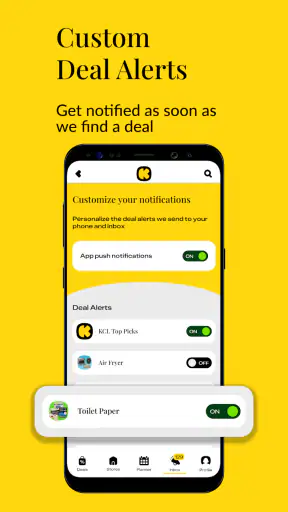
When I install any shopping-related app, I review the choices presented during setup and in the device settings. I look for notification controls, account options, and any prompts that affect how often the app can contact me. These checks are especially relevant here because coupon discovery can become noisy if every new offer demands attention.
I also prefer to browse without treating an account as an automatic requirement. If the app lets me explore offers before I commit to a personal profile, that is a better starting point for casual users. If a particular action requires sign-in, I want that requirement to be visible before I invest time building a list. The practical lesson is simple: use only the controls you actually need for the shopping task in front of you.
I do not assume that a free price means there are no data considerations. Shopping tools can involve retailer destinations, saved preferences, notifications, or other user choices, and those details deserve attention at the moment they appear. I read the permission prompts instead of approving them automatically, and I revisit system-level access when I no longer use a feature. This is a sensible habit with Coupons, Promo Codes, Deals and with any other app that sits close to my buying activity.
Where privacy-sensitive moments can appear
The most sensitive moments are not necessarily the coupon listings themselves. They arise when an app asks me to enable notifications, follow a retailer, save an offer, open an external shopping page, or create an account. Each action can make the experience more convenient, but each also increases the amount of attention or information involved. I decide separately rather than accepting every prompt as one package.
Notifications are a good example. They can be useful when I am waiting for a particular promotion, but constant deal alerts can encourage impulse shopping. I would enable them only if I have a clear reason, then turn them off when they stop being helpful. For a person who already receives many retailer emails and phone alerts, leaving notifications disabled may produce a calmer experience without removing the app’s basic browsing value.
I am equally careful when an offer sends me to a retailer. I check that the destination is the store I intended to use and that the promotion still appears during the shopping process. I avoid entering payment details into unfamiliar pages reached through random messages or unexpected redirects. The app can help me discover an opportunity, but I remain responsible for verifying where I am before completing a purchase.
A practical workflow that avoids wasted savings
My preferred workflow starts with a short list. Before opening the app, I write down the products or categories I genuinely need. I then search or browse for matching offers and note the important conditions: minimum spend, eligible products, expiry language, retailer, and whether the discount is automatic or requires a code. This prevents an attractive but irrelevant promotion from changing my entire basket.
Next, I compare the effective total with at least one ordinary alternative. A coupon may lower the listed price while shipping, membership conditions, or a less suitable product changes the real value. I also check whether the retailer has a direct promotion that is simpler to redeem. The app saves me research time, but it does not remove the need for a final comparison.
For a realistic example, imagine I am preparing a household order and already need cleaning products, toiletries, and pantry items. I can use the app to look for a relevant promotion, build the basket around products I would purchase anyway, and then verify the final discount at the retailer. If the offer requires adding unnecessary items, I skip it. That last decision is important: the best coupon is the one that lowers a planned expense, not the one that creates a new expense.
I also take a screenshot or note the essential code and conditions when a promotion is important to my purchase. I do not rely on memory, especially when moving between apps. If the discount fails, I remove the offer from my calculation rather than assuming it will be corrected later. This small habit keeps the budget honest and makes the app more useful as a planning tool.
Who will get the most from it
This app is a good fit for shoppers who regularly use large retailers and enjoy comparing offers before checkout. It is particularly helpful for people who buy repeat household goods, plan shopping trips in advance, or want one place to begin checking several familiar stores. New coupon users may also appreciate having deal ideas organized around recognizable shopping destinations instead of searching the web from scratch.
It can also suit a busy shopper who wants a quick second opinion. I may already know where I am buying something, yet still spend a moment checking whether a code or promotion changes the total. That is faster than manually searching several coupon pages, provided I keep the search tied to a real purchase.
On the other hand, I would not recommend making it the center of a highly controlled budget if browsing deals tends to trigger unnecessary spending. Someone who buys only from small local shops may find the retailer coverage less relevant to their routine. It is also not the right tool for a person who expects every coupon to work automatically without reading conditions or checking the final total.
How it compares with ordinary alternatives
The usual alternative is searching a retailer directly. That approach is cleaner when I already know the exact product and store, because the promotion appears close to checkout and there are fewer steps. The weakness is that I may miss a broader deal or a code that is easier to discover through a dedicated coupon app.
Another option is relying on retailer newsletters, loyalty programs, or browser searches. Those sources can be valuable, especially for store-specific benefits, but they may scatter information across inboxes and websites. This app’s advantage is convenience: it gives me a deal-oriented place to start. Its trade-off is that I still need to confirm the offer at the retailer, so it should complement rather than replace store tools.
Compared with a simple price-comparison habit, the app offers more promotional context but can require more attention. A price comparison may answer, “Where is this item cheapest?” A coupon app may answer, “Is there a code or promotion that changes this purchase?” I use both questions when the item is expensive enough to justify the extra step.
Where friction can change the value
The largest limitation is the changing nature of promotions. A deal can have conditions that are easy to overlook, and a code can stop applying when a retailer changes its offer. I therefore avoid treating a listing as a guaranteed final price. The app is strongest as a discovery layer, not as a promise that every saving will survive every checkout situation.
There is also a mental cost to too many choices. Browsing can turn a focused shopping trip into a hunt for bargains, and that can make me buy brands, quantities, or categories I did not plan to purchase. I manage this by setting a budget before opening the app and by asking whether I would still want the item without the promotion.
Finally, convenience can depend on how much switching I tolerate. Moving between the app, a retailer, and a checkout page is manageable for a planned order but annoying for a tiny purchase. For a low-cost item, I may prefer the retailer’s own search and checkout because the time saved is worth more than the possible extra discount.
My cautious verdict after using it
I see Krazy Coupon Lady as a useful, free shopping assistant for people who want to look for savings before buying from major retailers. Its strongest quality is not that it makes every purchase cheaper; it is that it gives me a structured place to begin looking for coupons, promo codes, and deals. The experience becomes much better when I bring a shopping list, verify conditions, and judge the final total rather than the promotional headline.
The app is suitable for everyone from a casual bargain hunter to a more organized household shopper, and its Everyone content rating keeps the intended audience broad. I would still review notification and account choices carefully, avoid granting access I do not need, and treat retailer checkout as the final authority on whether an offer applies. Those habits protect both my time and my budget.
My recommendation is therefore positive but measured. Install it if you regularly shop at the retailers it covers and are willing to spend a little time checking terms. Skip it if coupons tempt you into purchases, if you prefer a completely minimal shopping routine, or if direct retailer discounts already meet your needs. Used with that discipline, it can turn deal hunting from random searching into a practical step in a planned purchase.


